
PJSK Sticker Gallery Is Live
Until now, every PJSK sticker you made lived on your own device: you designed it, exported it, and that was that. Today the PJSK Sticker Gallery opens, and with it a one-click way to publish a PJSK sticker to the web — with its own permanent page, its own link, and its own likes.
This post walks through what shipped: the share button, the sticker page, and the gallery that ties them together.
What the PJSK Sticker Gallery gives you
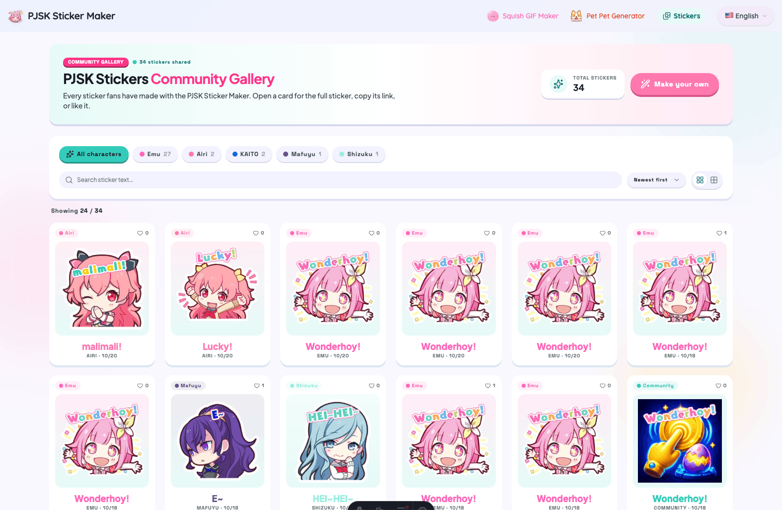
The gallery at pjskstickermaker.com/stickers is a live feed of every PJSK sticker the community has published. It is not a curated showcase that updates once a month — a sticker appears the moment its creator shares it, tagged with the character it uses and the text written in its bubble.
A few things worth knowing before you dive in:
- Every card is a real, downloadable PJSK sticker, not a screenshot. Copy it as a PNG or download the file straight from the card.
- The counter at the top is live. It reads the actual number of shared PJSK stickers in the database, so it grows as people publish.
- “Most liked” means liked. Sorting by popularity orders by like count, not by view count — the stickers that rise to the top are the ones people actually pressed the heart on.
How to share a PJSK sticker in one click
Sharing is deliberately boring, because the interesting part should be the sticker.
- Open the PJSK Sticker Maker and design your sticker as usual — character, bubble text, colors, outline.
- Pick an export size. The maker offers 320×320, 512×512 and 640×640. 512 is the size most chat apps expect from a sticker pack; 320 is lighter for slow connections, 640 is there if you want extra headroom.
- Press Share.
That is the whole flow. There is no title field, no description field, no tag picker. The title of your PJSK sticker is taken from the text you already wrote in its bubble, and the character is read from the art you used. You are not asked to fill in a form describing something you just designed.
A dialog opens with everything you need to get the sticker out into the world:
- Copy Link — the permanent URL for your sticker.
- Share to — X, Facebook, Telegram, WhatsApp, Reddit, Pinterest, Weibo and QQ, each with a pre-filled message.
- A QR code — handy if you want to move the sticker from desktop to phone.
- Open Share Page — jump straight to the sticker’s own page.
On mobile, the native share sheet is offered too, so a PJSK sticker can go from canvas to a group chat in two taps.
Sharing is free and needs no account. Shared images are capped at 3 MB, which a 640×640 WebP sticker clears easily.
Every PJSK sticker gets its own page
A shared PJSK sticker is not just a file sitting in a folder. It gets a dedicated page at /sticker/<id> that works as a landing page, a download page and a conversation starter at once.
Here is what a visitor finds there:
- The sticker itself, rendered large on a light, night or transparent-grid backdrop so you can judge how it will look in a chat.
- A like button with a live count.
- Copy Image — puts a 512×512 PNG on the clipboard, ready to paste into Discord, WhatsApp or LINE.
- Download — saves the file to the device.
- Share Link — copies the page URL, so you can send the page rather than the image.
- A specification sheet listing the exact settings the sticker was made with: text, colors, outline, size. Nothing is hidden — anyone can see how a PJSK sticker was built.
- Comments, powered by Disqus, for anyone who wants to react in words rather than hearts.
The page also shows the character, the date it was shared, and — for stickers built on official art — a link into the maker so you can go straight from admiring someone’s PJSK sticker to making your own.
Likes work without an account. The site issues an anonymous cookie that remembers which stickers you liked, so the hearts stay filled when you come back a week later. It stores no name, no email, nothing that identifies you.
Finding the right PJSK sticker
A gallery is only useful if you can dig through it, so every filter lives in the URL. That means any view you build can be bookmarked or sent to a friend.
Filter by character. Chips across the top list every character that actually has stickers in the gallery, along with a count. If a character has no stickers yet, the chip is not there — the filter never leads to an empty page.
Search the bubble text. The search box matches both the sticker’s text and its character name, so you can look for a specific quote, a catchphrase, or every sticker featuring a particular name.
Sort three ways. Newest first, oldest first, or most liked.
Switch the layout. Grid view shows character chips and dates; compact view packs more stickers on screen at once. Your choice is remembered in the browser.
The gallery loads 24 stickers at a time with a Load more button, so the first page arrives fast even as the collection grows.
Built for chat apps, not just browsers
Every PJSK sticker in the gallery is stored as a WebP with a transparent background, served from a CDN. That matters for two reasons.
First, transparency is the whole point of a sticker. A PJSK sticker with a white box around it is a picture, not a sticker.
Second, WebP keeps file sizes small enough for chat apps to accept without visible quality loss. When you copy an image from a card or a sticker page, the site renders it to a 512×512 PNG in the browser first — because most chat apps still prefer PNG on the clipboard.
No account, no upload form
There is no sign-up anywhere in this feature. You do not create a profile to share a PJSK sticker, and you do not log in to like one.
The trade-off is honest: without accounts there is no ownership system, so stickers are published anonymously and the site does not offer a “delete my sticker” button. Share something you are happy to have out in the world. The terms of service still apply — no illegal, hateful or infringing content — and comments are moderated through Disqus.
Five languages, one PJSK sticker community
The gallery and every sticker page are available in English, Japanese, Simplified Chinese, Russian and Turkish, matching the rest of the site. Switch languages and you stay on the same page — the gallery keeps your filters, and a sticker page keeps its ID, so a link works no matter which language the person opening it speaks.
Frequently asked questions
Is sharing a PJSK sticker free? Yes. Making, sharing, browsing and downloading PJSK stickers are all free, with no account and no watermark.
What size should my PJSK sticker be? 512×512 is the safe default for WhatsApp, LINE, Telegram and Discord. Use 640×640 if you want extra detail, or 320×320 for the smallest file.
Can I use a shared PJSK sticker in my own chat? Yes — that is what the gallery is for. Copy the image or download it, then import it into your chat app’s sticker editor.
Do shared PJSK stickers show up in Google?
Sticker pages are marked noindex on purpose. They are user-generated content and belong in chats and shares, not in search results — the gallery itself is the page built to be found.
Where are the stickers stored? Images live in Cloudflare R2 behind a CDN; the gallery index lives in Turso. Neither stores anything about you beyond the anonymous like cookie.
Make your first PJSK sticker
The fastest way to see how this works is to publish one.
Open the PJSK Sticker Maker, design a PJSK sticker, and press Share. Then head to the PJSK Sticker Gallery and find it sitting at the top of “Newest first” — next to everyone else’s.
The best PJSK stickers are the ones people actually use, and the gallery is where you find out which ones those are.
This post is part of the official PJSK Sticker Maker blog. Follow along for feature updates, guides and community highlights.